What is the Hue Bridge?
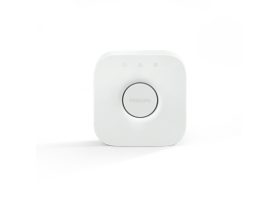
The Philips Hue Bridge is the heart and brain of the Hue smart lighting system. It connects all your Philips Hue lights and accessories to your home network, allowing them to communicate and work together seamlessly.
Think of it as your lighting system’s command center — enabling remote control, automations, voice integration, and entertainment sync that wouldn’t be possible with Bluetooth alone.
In this article, you’ll learn what the Hue Bridge and Hue Bridge Pro do, how they work, and which one best fits your smart home setup.
Why do you need a Hue Bridge?
While many Hue bulbs work via Bluetooth, the Bridge unlocks advanced capabilities such as:
- Remote access to your lights from anywhere.
- Integration with Alexa, Google Assistant, and Apple HomeKit.
- Automations and routines (like “Wake Up” or “Away Mode”).
- Entertainment features that sync with music, movies, or games.
- Scalability, supporting up to 50 lights and 12 accessories on one hub.
Without a Bridge, you’re limited to controlling up to 10 bulbs locally via Bluetooth — no automations, no voice control through HomeKit, and no access when away from home.
How the Hue Bridge Works: Understanding the Smart Lighting Hub
The Hue Bridge operates as a dedicated communication hub that uses Zigbee technology — a secure, low-latency wireless protocol built for smart homes.
1. Zigbee Network
The Bridge establishes a private Zigbee network for all your Hue lights. This network is separate from your WiFi, ensuring your smart lights don’t interfere with your internet performance.
2. Mesh connectivity
Each Hue bulb acts as a signal repeater, creating a mesh network. The more bulbs you add, the stronger and more reliable your signal becomes throughout the home.
3. The Internet gateway
The Bridge connects to your router using an Ethernet cable, serving as a gateway between the Zigbee network and the internet. This is what enables app control, remote access, and integration with third-party platforms like Apple Home, Google Home, Alexa, and Matter.
Key features of Hue Bridge
| Feature | Hue Bridge (V2) | Hue Bridge Pro |
| Max Lights | 50 | 150+ |
| Accessories Supported | 12 | 30+ |
| Technology | Zigbee | Zigbee + Matter |
| Network Connection | Ethernet | Ethernet + Enhanced local control |
| Extra Features | Standard automations and scenes | Adds MotionAware™, expanded range, and pro-grade integrations |
If you have a large home or professional setup, the Hue Bridge Pro offers expanded device capacity and higher performance.
Main function of the Hue Bridge
The Bridge acts as the foundation for all your Hue smart lighting experiences:
- Central Hub: Links every Hue light, switch, and sensor in your system.
- Smart automations: Lets you schedule lights to turn on/off or change brightness and color automatically.
- Voice control: Seamlessly integrates with major assistants like Alexa, Google Assistant, and Siri.
- Entertainment sync: Allows your lights to react dynamically to movies, music, or gaming.
- Secure connectivity: Keeps your smart lighting network stable and isolated from WiFi disruptions.
The Hue Bridge Pro-Next-gen performance
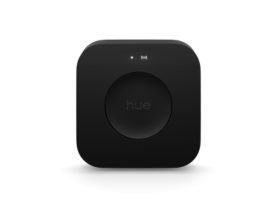
The Hue Bridge Pro builds upon the standard model with upgraded processing, better Zigbee coverage, and Matter compatibility, ensuring future-proof integration with the next generation of smart home devices.
It’s designed for larger homes or professional installations that demand ultra-reliable control and advanced automation features like MotionAware™, which adapts lighting based on human presence and movement.
How to set up the Hue bridge
Step-by-step setup
- Connect the Bridge to power using the included adapter.
- Plug the Ethernet cable into your WiFi router.
- Wait for the LEDs on the Bridge to turn solid blue (indicating power, network, and internet connection).
- Download the Philips Hue App (iOS or Android).
- Follow the In-App Setup Wizard to detect and link your Bridge.
- Add Lights and Accessories and start building your personalized lighting scenes.
Once connected, the Bridge acts as the backbone for your entire Hue ecosystem.
Final thoughts
The Philips Hue Bridge is the core component that transforms individual bulbs into a complete smart lighting ecosystem.
While Bluetooth control is great for small setups, the Bridge — and especially the Bridge Pro — unlocks automation, entertainment sync, and voice-enabled convenience across your home.
Whether you’re starting with a few bulbs or managing a whole smart lighting system, the Hue Bridge ensures your setup stays fast, stable, and future-ready.
Explore the Hue smart lighting controls
Philips Hue Control products
Hue
Bridge Pro
$98.99