Ratings and Reviews
Overall score: 3
9 reviews
Unusable due to terrible hardware design
2026-10-18T01:23:15.000+00:00
WillNotBill
1
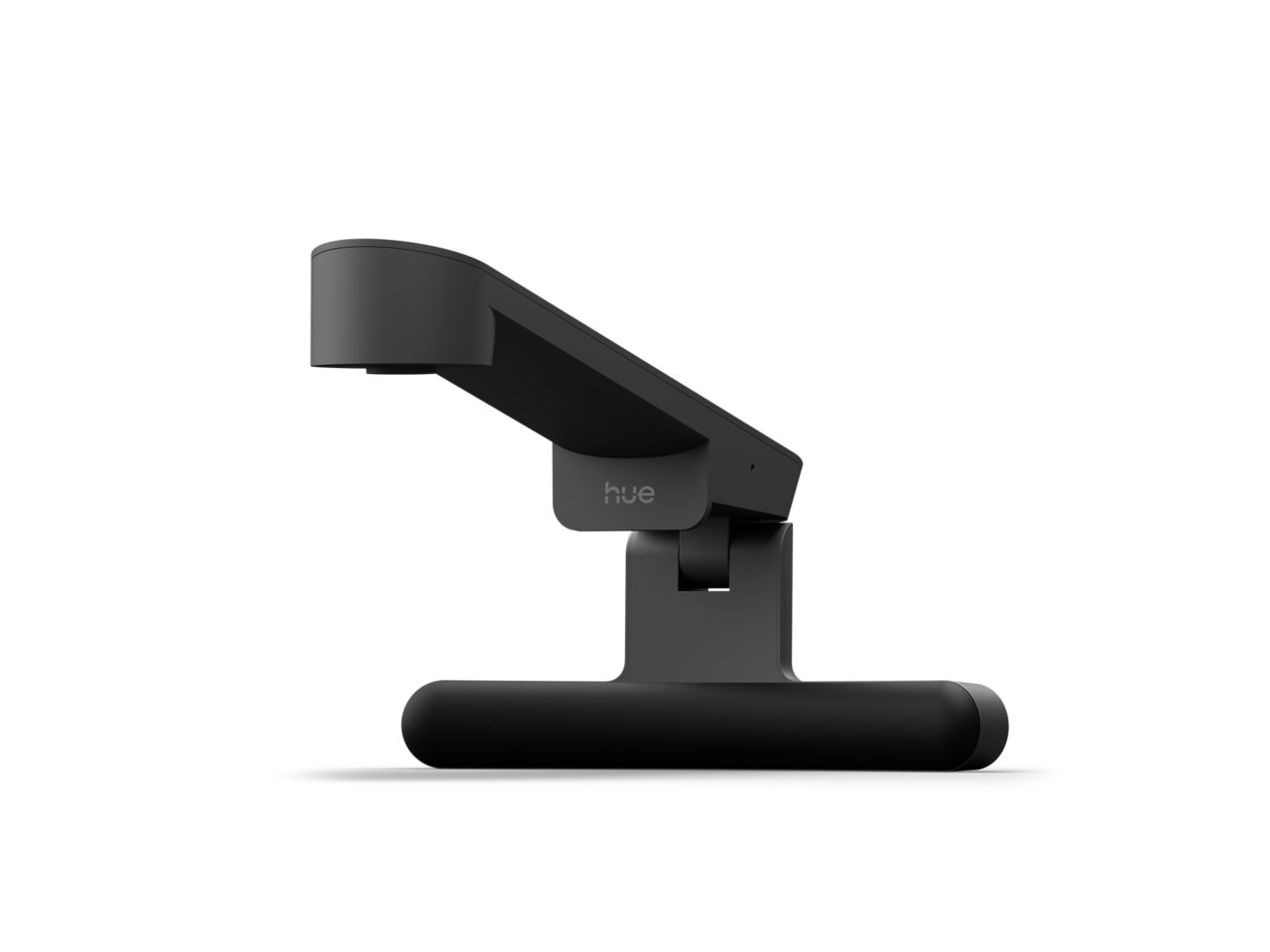
I was really excited for the Screen Sync, but the hardware design is terrible! Unless your TV is 1.2" or thinner, there's no way to mount the product. The hinge is bottom-mounted to the main body and doesn't fold flat against it, so there's no flexibility in how thick the TV can be or how you can place the unit on top of one. This seems like a problem that was solved years ago by webcam manufacturers who mounted the hinge at the back of the body or used dual hinges to improve the compatibility of their products with virtually any monitor. There's no indication in the features, specs, or FAQs that this is an issue or that buyers should measure their TV prior to purchasing. Furthermore, there's a stress fracture that seems to be a manufacturing defect where the hinge is attached to the main body. They should scrap this product and engineer an updated version with different hardware. As a long-time Philips Hue customer, I question whether they even tested this product before its release, but if this is indicative of what to expect from new products then I'll be taking my business elsewhere.
Easy setup, great auto calibration
2026-10-18T03:15:05.000+00:00
ruyval
5
Really easy to install and get running. The automatic calibration works surprisingly well to detect the TV and makes the whole setup very simple. One tip: make sure the room is bright enough during calibration and play some full-screen content on the TV. I got the best results that way. Once it’s calibrated, it just works with my movies and games. The lighting feels very responsive to what’s happening on screen.
Works great if you follow the simple directions!
2026-10-18T00:19:52.000+00:00
Brian
5
To the first person to review this, they were right to make sure its bright and actually have moving video on the screen when calibrating. I originally did it with my Xbox at its home screen and my bedroom lights after calibration were just weird and didn't sync all that great but after seeing his review figured to actually do also what it says during setup (which is incredibly easy) and now that i actually followed the directions while having Family Guy play on the TV, my lights are synced up better, the color matches better. We have the OG 4k Hue Sync in our bedroom but a 120hz OLED and can't do 120hz on Xbox or PS5 with that Hue sync but we can officially use the 120 with this camera which is great since at the moment we can't afford another 8K hue sync box. A good cheaper alternative so thank you!
POOR Mounting Design
2026-10-18T03:15:35.000+00:00
ikojoe
1
Only works with thin TVs. HUE does not tell you that there is no way to adjust the mount depending on TV thickness. Poor mounting system design with no adjustment capability for a thicker TV.
Disappointing compared to hdmi sync box
2026-10-18T03:16:34.000+00:00
huestonTexas
3
I got this for a bedroom that has a sync-play strip behind the tv and a couple of other hue lights in the room. It was easy to set up, but it wasn't nearly as reactive or accurate as the hdmi sync boxes.
Does not work
2026-10-18T03:15:46.000+00:00
Iko
1
Returning it. Does not work. Hue lights do not adjust stay one color at 1%. Mount sucks. Have a slightly larger TV and mounting system cannot adjust enough for it. Extremely disappointing product.
Don’t waste your money
2026-10-18T03:15:56.000+00:00
Mark
1
This thing is terrible. I’ve calibrated and adjusted my lights/devices, reduced glare on the tv screen, etc. and this thing still barely functions. When it does function, only half of my room lights up appropriately. Should have bought the sync box but I didn’t want to have limitations with only being able to use my Xbox for everything.
Awesome canera
2026-09-29T13:39:38.000+00:00
Aiden
5
Had zero issues with it. Easy to install. Just try to figure out where the center is. You don't have to go overboard with a ruler. You can just figure it out through eyesight. It uses a fisheye lens so you have some leniency I was a little afraid of the beginning to put it on my television because it's a mini LED quantum. That's borderline frameless but the thing doesn't grab like with a tooth. It barely hovers over and there's a little mechanism behind it like a way that keeps it in place. It's specifically says to tune it with moving scenes. The best way to do it is get a dance video that uses non-stop color and movement. We're talking about rapid color flashing , movement and that kind of stuff. Instant calibration. I actually concentrated more on the center field of my TV as well as the left and the right separated. Since my house is larger from left to right living room wise, I didn't want any gaps and color. I don't know what else to say. It was the best money I've ever spent. And it's phenomenal for gaming and really awesome for movies.
And Phillips Said "Let There Be Light!"
2026-10-13T20:08:11.000+00:00
Mr. Muggy
5
Just to start this off, this is a wonderful product. I never bought a sync box due to it only working through HDMI and I watch on a smart TV which won't work with the sync box while streaming. Only using a sync box for gaming would feel like a waste. Well, that's not a problem with this. It works without the use of HDMI, it just needs plugged in, set on top of your TV (no sticky pads or hooks), and set up with the app. Keep in mind you will need a hue bridge to make it work. I had some issues with the set up through the app, but it eventually got through. To save time, make sure the hue bridge info in the app says Connected without (Remote Access) following it. If you see the (Remote Access) simply disconnect your phone from wifi and reconnect after a few seconds and it should just go to Connected. After that, the set up should go fairly smooth. That technique also works if for some reason your screen play won't connect in the app after setup. The Screen Play does what it says it does with a lot more functionality and (probably) ease of setup over the sync box. If you want to take your viewing immersion to the next level, give this a try!