Hue SpatialAware: A New Capability That Brings Lighting Design to Life
Philips Hue is known for beautifully crafted lighting that adapts to your lifestyle. With Hue SpatialAware, a new groundbreaking feature available exclusively with Hue Bridge Pro, we’re introducing a whole new level of intelligent, adaptive lighting. This feature gives your Hue system something it’s never had before: a true understanding of your room.
SpatialAware automatically applies lighting design concepts to your home, eliminating the need for expertise, guessing, or manual adjustments. By distributing the colors of remastered Hue scenes across all the Hue lights to the specific layout and light positions in your room, it completely changes how you experience lighting.
Lighting That Understands Your Space
Unlike traditional setups where each light is treated as a separate device, SpatialAware allows Hue to understand where each light is in your room. Using the latest augmented reality technology, your phone or tablet’s camera scans the room to map the position of each light. This spatial model allows the system’s algorithm to bring your lighting to life in the most natural and immersive way.
Drawing on our professional lighting design principles — such as how colors flow through a space, how gradients behave, and how different types of lights complement each other — SpatialAware orchestrates Hue gallery scenes across all your lights with precision, inspired by nature.
Light settings like sunsets, color washes, and ambiance transitions appear as if they were tailored for your space.
If you move or add a light, the app guides you through a quick rescan of some lights and instantly updates the layout and recalibrates your scenes.
What Makes SpatialAware Different
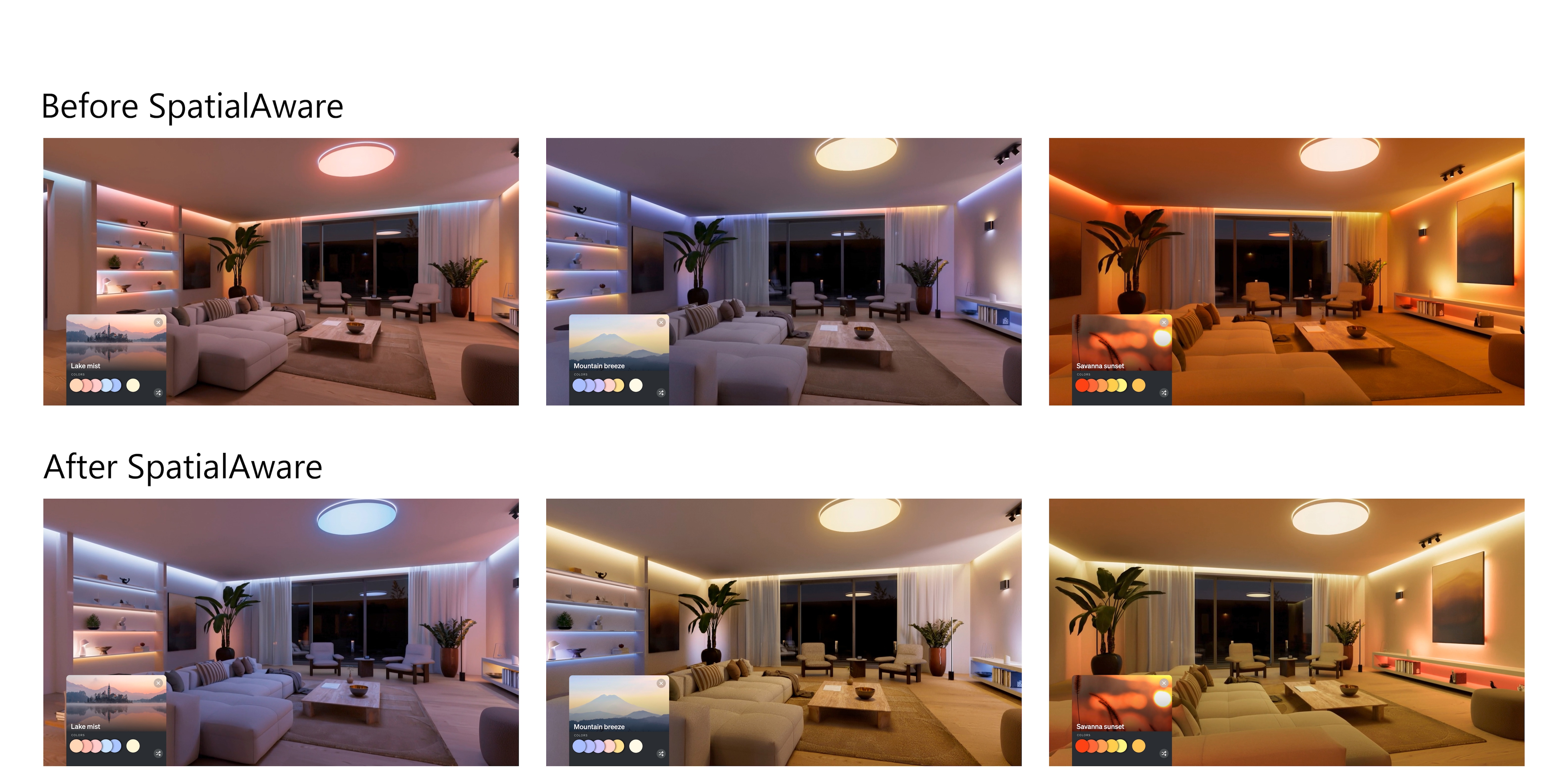
Before SpatialAware, Hue scenes were intelligently applied based on the form, function, capabilities, and configuration of your lights. However, without knowing the exact placement of each light in the room, light distribution could feel somewhat random.
With SpatialAware remastered Hue scenes are now:
· Tailored to your room layout, rather than applied generically
· Smoother and more cohesive, especially for nature-inspired scenes
· More natural, with light settings precisely distributed across your entire room structure
SpatialAware shines is great for rooms with many Hue lights, but even smaller setups benefit. Especially in spaces that combine gradient products, such as the Play wall washer or Twilight lamp, with a ceiling light or pendant.
The algorithm intelligently scales and distributes the colors of each Hue scene across your lights, just as a professional lighting designer would, creating a more natural, balanced, and immersive ambiance.
Full Control, Your Way
SpatialAware is entirely up to you:
- Enjoy remastered scenes from your scene gallery.
- Choose to switch to the non-spatial version of a scene from the scene gallery.
- Continue using your original non‑spatial scenes.
- Upgrade your existing scenes (from the scene gallery) on your bridge to spatially optimized versions at any time.
- Switch back from spatial to non-spatial when editing a scene.
If you leave any room unscanned, the system will use the classic non-spatial distribution of scenes. You choose the experience that best fits your home.
Remastered Gallery scenes optimized for SpatialAware
Around half of the remastered scenes in the Hue Scene Gallery are already optimized for SpatialAware, including well-loved nature- inspired scenes like Savanna Sunset, Mountain Breeze and Lake Mist. Additional SpatialAware-ready scenes will be added over time as we continue evolving the experience.
Exclusive to Hue Bridge Pro
Hue SpatialAware is a new capability exclusive tothe Hue Bridge Pro, unlocking more advanced processing and scene intelligence.
There’s no need for new lights, additional hardware,or subscriptions. Simply update your Hue app and Bridge Pro to the latest versions and follow the in-app instructions to scan your room and start enjoying SpatialAware scenes.
Quick, Simple Setup
Setting up SpatialAware is fast and intuitive. Scanning a room with around 10 lights typically takes less than a minute, and once the scan is complete, the remastered scenes from the gallery adapt automatically to your room. There is no need for manual scene editing or adjusting individual lights.
You can choose to either scan the physical light (i.e. a pendant or table lamp), or the light effect it creates on a surface (i.e. your wall for spotlights). We recommend the second option for those lights that create a large wide-spread light effect on a wall further away from the spot.
Phones with LiDAR:
Aim at the blinking light --> Tap "+" --> Verify that the dot’s location is aligned with the light or light effect --> Tap Next to scan the next light.
Phones without LiDAR:
Aim at the blinking light --> Tap "+" --> Step sideways and aim again --> Tap "+" --> Verify that the dot’s location is aligned with the light or light effect --> Tap Next to scan the next light.
To apply SpatialAware across multiple rooms, ensure that each room in the zone is scanned.
Rescanning
You need to rescan a light and up to 3 other lights in a room, when:
- You added a new light
- You moved a light
Try to scan the same point you scanned originally (light or light effect).
Quality of your Spatial map
To get the best possible experience with spatial mapping, keep the following in mind:
- All lights in the Room should be powered-on (reachable) and scanned. If you add a light to the Room, make sure to update the spatial map and rescan.
- If you physically move a light to a new location within the room, you should rescan that light.
- Color-capable lights and ceiling or pendant lights will vastly improve the lighting experience.
- Lights placed at different heights across your room will improve the functionality of the spatial map.
Designed by People, Not AI
SpatialAware does not use AI to generate lighting effects. It uses spatially remastered scenes crafted by the Hue design and research teams and uses algorithms to tailor light scenes to the specific layout and light positions in your room.
The same expertise is fed into the Hue AI assistant to allow the remastered nature-inspired scenes to also be optimized with SpatialAware.
Voice Control and Automation
Because scenes are stored on the Hue Bridge Pro, SpatialAware scenes can be activated using:
- The Hue app
- Accessories
- Automations
- Voice assistants
- Widgets
- 3rd party apps
Spatially optimized scenes integrate seamlessly with all your existing controls.
Privacy Built into the Design
Your privacy is central to how SpatialAware works:
- No images or scan data are stored. The process does not save photos, videos, or room maps.
- All processing happens locally on your device.
- No information is uploaded or shared at any point.
Your room stays your own, always.