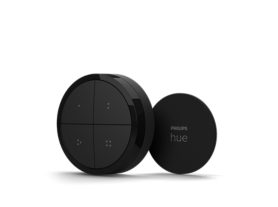
Smart button

Current price is $32.99

Current price is $32.99

In stock

  • Buy now and pay later with Klarna
  • Free Shipping on orders over $49.99
  • Free Returns for 30 Days
  • 2 Year Warranty

Ensure you’re fully equipped

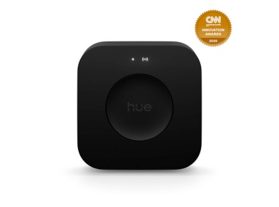
Bridge Pro

Bridge Pro

$139.99

For a Smart button a new bridge is required

About the Smart button

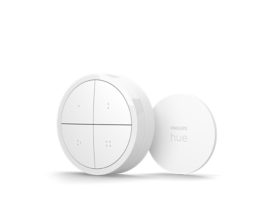
Smooth and sleek, this larger smart button allows you to trigger scenes based on time of day, or cycle through a selection. Press and hold to dim and brighten your lights, or even set it to start an automation.

  • Controls any Hue light
  • Trigger an automation
  • Battery powered
  • ⌀45 mm
  • Features

    Product number (EAN/UPC)
    046677605773

    Design and finishing

    Color
    White
    Material
    Synthetic

    Environmental

    Operational humidity
    0%<H<80% (non condensing)
    Operational temperature
    0°C - 40°C

    Extra feature/accessory incl.

    Batteries included
    Yes
    Portable
    Yes

    Guarantee

    2 years
    Yes

    Packaging dimensions and weight

    EAN/UPC - product
    046677605773
    Net weight
    0.04 kg
    Gross weight
    0.07 kg
    Height
    36 mm
    Length
    100 mm
    Width
    72 mm
    Material number (12NC)
    929004582202

    Packaging information

    EAN
    046677605834

    Product dimensions and weight

    Overall height
    9/16 inch
    Overall width
    3/16 inch

    Service

    Warranty
    2 year(s)

    Technical specifications

    Number of configurable buttons
    1
    Battery type
    CR2032
    IP code
    IP20
    Mounting options
    Wall, Standing

    The bulb

    Software upgradable
    Yes

    The switch

    Batteries included
    1 x CR2032
    Configurable buttons
    1
    Lifetime
    50000 clicks
    Max. lights per switch
    50 (with Hue Bridge)
    Minimal battery lifetime
    2
    Mounting options
    freestanding, wall

    What's supported

    Compatible with Effects
    No
    HomeKit compatible
    Yes
    Philips Hue App
    iOS 16 or later
    WiFi
    Works without Wi-Fi
    Defined support period
    Minimum 60 months from date of purchase from an authorized reseller
    Max. number of accessories
    12 (with Hue Bridge)
    Compatible operating systems
    iOS, Android
    Communication protocol
    Bluetooth, Zigbee
    Compatibility with 3rd party systems
    Alexa, Google Home, Apple Home, IFTTT, Klikaanklikuit, Matter, Samsung Smartthings, Sonos

    Other

    User manual
    User Manual
    Disposal of the product
    At the end of (economic) life dispose the product according to local rules and do not dispose the product with regular household waste. The correct disposal of your product will help prevent potential negative consequences for the environment and human health
    Dismantling
    No dismantle information available
  • FAQs

    How many Hue lights can I control with the Hue tap dial switch?

    A Hue tap dial switch can control up to three Rooms, a Zone, or even your entire smart lighting setup. It’s up to you! Each button can be configured independently of each other, for ultimate flexibility. Additionally, the dial can be set to dim up or down yet another group of lights. If you prefer to control only a subset of lights within a Room, we recommend first creating a Zone out of them, to get the most flexibility in terms of creating and selecting scenes for them

    How many Hue lights can I control with the Hue smart button? 

    A Hue smart button can control up to two Rooms, a Zone, or even your entire smart lighting setup. It’s up to you! If you prefer to control only a subset of lights within a Room, we recommend first creating a Zone out of them, to get the most flexibility in terms of creating and selecting scenes for them

    What can the Hue dimmer switch, smart button, and tap dial switch do?

    The Hue dimmer switch, smart button, and tap dial switch can be configured to different modes of operation, depending on your needs. For example, you can set it to trigger different scenes based on the current time of the day, cycle through your favorite scenes on repeated presses, turn on always the same scene, turn some or all lights in your setup off, or even start/stop automations. You can configure these via the Hue app. 

    The dimmer switch features two dedicated buttons for dimming up and down, whereas the tap dial switch can do this by rotating the dial. The smart button dims up/down by long pressing the button; once you reach the min or max/ brightness, release and long press again to dim in the opposite direction

    How can I add my Hue dimmer switch, smart button, or tap dial switch to my Hue setup?

    You can add a Hue dimmer switch, smart button, or tap dial switch to your setup by going to the Hue App > Settings > Devices and tapping on the + button

    Do I need to connect any electrical wires to install the Hue dimmer switch, smart button, or tap dial switch?

    No. The Hue dimmer switch, smart button, or tap dial switch are battery powered and wireless, so you won’t have to do any rewiring.

    The old version of the dimmer switch (it has separate on and off buttons compared to the current version) used a CR2450 battery; the current version of the dimmer switch, the smart button, and the tap dial switch all use a CR2032 battery

    Via the Hue app you will find details about the expected lifetime of the current batteries.

    What is the difference between the old and the current versions of the Hue dimmer switch?

    There are minor mechanical and finishing differences, and the labels and default behavior of the top and bottom buttons are different. The old Hue dimmer switch had a dedicated on button on the top and off button on the bottom, whereas the current version has an on/off button for toggling lights on the top and a Hue button on the bottom. All buttons in either version of the Hue dimmer switch can be configured with the same set of functionalities.

    How can I go back to the factory settings of my Hue dimmer switch, smart button, or tap dial switch?

    In case you want to restore the default configuration of the Hue dimmer switch, smart button, or tap dial switch, or if trying to remove undesired behaviors, navigate to the edit screen of your device and tap on the Reset button. If issues persist, consider deleting the switch from the Hue app and resetting the device physically by pressing the setup button/pinhole for more than 10 seconds and then re-adding it via the Hue app.

    Can I use a Hue dimmer switch, smart button, or tap dial switch to control my outdoor lights?

    Yes. You can set up a Hue dimmer switch, smart button, or tap dial switch to control your outdoor Hue lights via the Hue app. However, they are rated for indoor use, so be sure to only use them inside.

    Can I customize the settings of a Hue dimmer switch, smart button, or tap dial switch without a Hue bridge?

    No. A Hue bridge is required to be able to change the way a Hue dimmer switch, smart button, or tap dial switch controls your lights

    What is the difference between the Tap dial switch and the Tap dial switch with mini mount?

    The only difference is the mount that the Tap dial switch comes with. The mini mount is a small, circular mount that sits directly behind the switch. You can't see it when the Tap dial switch is mounted on it, so it's a more discreet mount.

    How many Hue lights can I control with the Hue dimmer switch?

    A Hue dimmer switch can control up to two Rooms, a Zone, or even your entire smart lighting setup. It’s up to you! Although the buttons are configured by default to control the same groups of lights, you can edit the settings to control different lights per button. If you prefer to control only a subset of lights within a Room, we recommend first creating a Zone out of them, to get the most flexibility in terms of creating and selecting scenes for them

    Where can I mount the Hue dimmer switch, smart button, or tap dial switch?

    Attach the wall plate or mounts to any flat surface using the included adhesive backing or screws (if available). You can also remove them from their wall plate or mounts and use them anywhere in your home or attach them to any magnetic surface. Make sure that these locations are within range of your setup

    What is the smart on/off feature?

    Buttons on your Hue dimmer switch, smart button, or tap dial switch have the smart on/off option to toggle lights. If enabled, when pressing the button the lights will be turned off if they were previously on, or will go to the appropriate scene depending on the mode if they were previously off.

    Can I use the Hue dimmer switch, smart button, or tap dial switch with automations?

    Yes! Their buttons can be configured to either trigger lights or automations. If selecting automations, you will be allowed to start and/or stop any of your automations that can be manually activated via the app. For example, you can configure button 2 of your Hue tap dial switch in the bedroom to start your go to sleep automation, or your Hue smart button by your front door to start the mimic presence automation whenever you go out

    What do I need to set up my Hue dimmer switch, smart button, or tap dial switch?

    We recommend a Hue bridge to customize how you can control your lights, as well as the Hue app, and at least one Hue light (sold separately). If you don't have a bridge, you can connect these switches to up to 10 lights

  • Ratings and Reviews

    Overall score: 4

    4 reviews

    My favorite accessory

    2026-07-13T13:15:18.000+00:00

    dance-with-me

    5

    One of my favorites Hue accessories. It looks nice in many different places and easy and pleasant to interact with.

    Perfect accessory to complement my Hue lights.

    2026-07-13T13:00:11.000+00:00

    LetThereBeLight

    5

    I just purchased this from Amazon and really like the dial to control the intensity of my Hue lights (10 of them) with a simple twist of the wrist. Simple to set up and works flawlessly with the Hue app.

    Must have accessory

    2026-07-13T12:49:25.000+00:00

    LetThereBeLight

    5

    Perfect accessory for Hue lighting. Easy to setup and just needs a battery every 2-3 years to operate my 10 lights. I prefer the tactile touch for turning on my lights over using the app on my iPhone.

    Would I Recommend?

    2026-07-10T14:16:51.000+00:00

    Rob H

    1

    I purchased this to replace my older Philips hue switches that are now bricked after latest update. Product page states compatibility with Apple home but have had no success in getting it to work. there is no user manual available and haven't found anything helpful online. request for assistance have gone unanswered.

Frequently bought together

Create a starter kit
Hue Tap Switch Mini White

Hue Tap Switch Mini White

Wireless installation
Battery powered
Easy access to light scenes
Use as a remote control

$54.99

Create a starter kit
Dimmer Switch (latest model)

Dimmer Switch (latest model)

Wireless installation
Battery powered
Easy access to light scenes
Use as a remote control

$30.99

60W A19 3PACK- E26 smart bulbs

60W A19 3PACK- E26 smart bulbs

Up to 810 lumen
Full-spectrum daylight
Ultra-low dimming 0.2%
Chromasync™ precision color

$147.99

Essential A19 - E26 smart bulb - 800 lm - 8.8W - 4 pack

Essential A19 - E26 smart bulb - 800 lm - 8.8W - 4 pack

Up to 800 lumens
Essential white light
Low dimming to 2%​
Essential color ​

$59.99

Bridge Pro

Bridge Pro

Supports 150+ lights, 50+ accessories
Enables Hue Sync, MotionAware™
Unlocks whole-home control
Advanced encryption with Zigbee Trust Center

$139.99

Smart plug

Smart plug

Add any light to your Hue system
Instant control via Bluetooth
Control with app or voice*
Add Hue Bridge to unlock more

$37.99

60W A19 2PACK- E26 smart bulbs

60W A19 2PACK- E26 smart bulbs

Up to 810 lumen
Full-spectrum daylight
Ultra-low dimming 0.2%
Control using app or voice

$48.99

Motion sensor

Motion sensor

Wireless installation
Automates your lights
Adjusts light to time of day
Mounts anywhere

$48.99

Starter kit: 4 E26 color-capable bulbs + Bridge Pro

Starter kit: 4 E26 color-capable bulbs + Bridge Pro

Supports 150+ lights, 50+ accessories
MotionAware™ technology
White ambiance +16 million colors
Advanced encryption with Zigbee Trust Center

$289.99

Hue Play wall washer

Hue Play wall washer

ColorCast technology
1035 lumens
Height x width: 6,2 x 3,6 inch
Matte black

$399.99

New
Hue Flux strip light extension 16ft

Hue Flux strip light extension 16ft

5-meter extension / 16ft
Easy installation
Bright, true white light
Chromasync™ precision color

$89.99

Sale
Multipack: Smart plug 3-pack

Multipack: Smart plug 3-pack

Bridge enabled
Add any light to your Hue system
Instant control via Bluetooth
Control with app or voice*

$113.97

$102.57

BR30 - E26 smart bulb - (2-pack)

BR30 - E26 smart bulb - (2-pack)

White and colored light
Instant control via Bluetooth
Control with app or voice*
Add Hue Bridge to unlock more

$109.99

Festavia permanent outdoor lights 90 ft white string

Festavia permanent outdoor lights 90 ft white string

White string
90 ft with 48 lights
White and color gradient
Up to 50 lm per light

$399.99

Festavia permanent outdoor lights 150 ft white string

Festavia permanent outdoor lights 150 ft white string

White string
150 ft with 80 lights
White and color gradient
Up to 50 lm per light

$599.99